Data & sync
Planner sync across devices, calendars, and backups
See how synced account data, browser storage, Google and Outlook calendar connections, backups, exports, and recovery work in the live product.
Synced account copy
When you are signed in, the account copy is what keeps your planner consistent across devices.
Local working copy
Your browser keeps a working copy for speed, while synced writes are confirmed against the API.
Backups and recovery
Data export and rolling backups give you a recovery path if you need to restore your workspace.
How sync works
Browser storage is the working copy. Sync is the account copy.
When you are signed in, Cavatim writes planner and goal changes to the API and mirrors the same information in the browser so the product stays responsive. If a write cannot be accepted by the API, it is treated as a sync problem rather than silently becoming the new source of truth.
- Local storage helps the app load quickly and survive short interruptions.
- Signed-in planner sync keeps the same data available across mobile, tablet, and desktop.
- If you use the product without signing in, browser-only data can be lost if that browser storage is cleared.
Connected calendars
Google and Outlook calendar connections are optional
If you connect Google Calendar or Outlook, Cavatim imports the calendar data you choose so you can see meetings and existing commitments in the planner. You control which accounts and calendars are connected, and you can disconnect them again from Settings.
Screens
See the trust-sensitive parts of the planner.
Sync proof
The account copy, calendar connections, and recovery tools are visible.
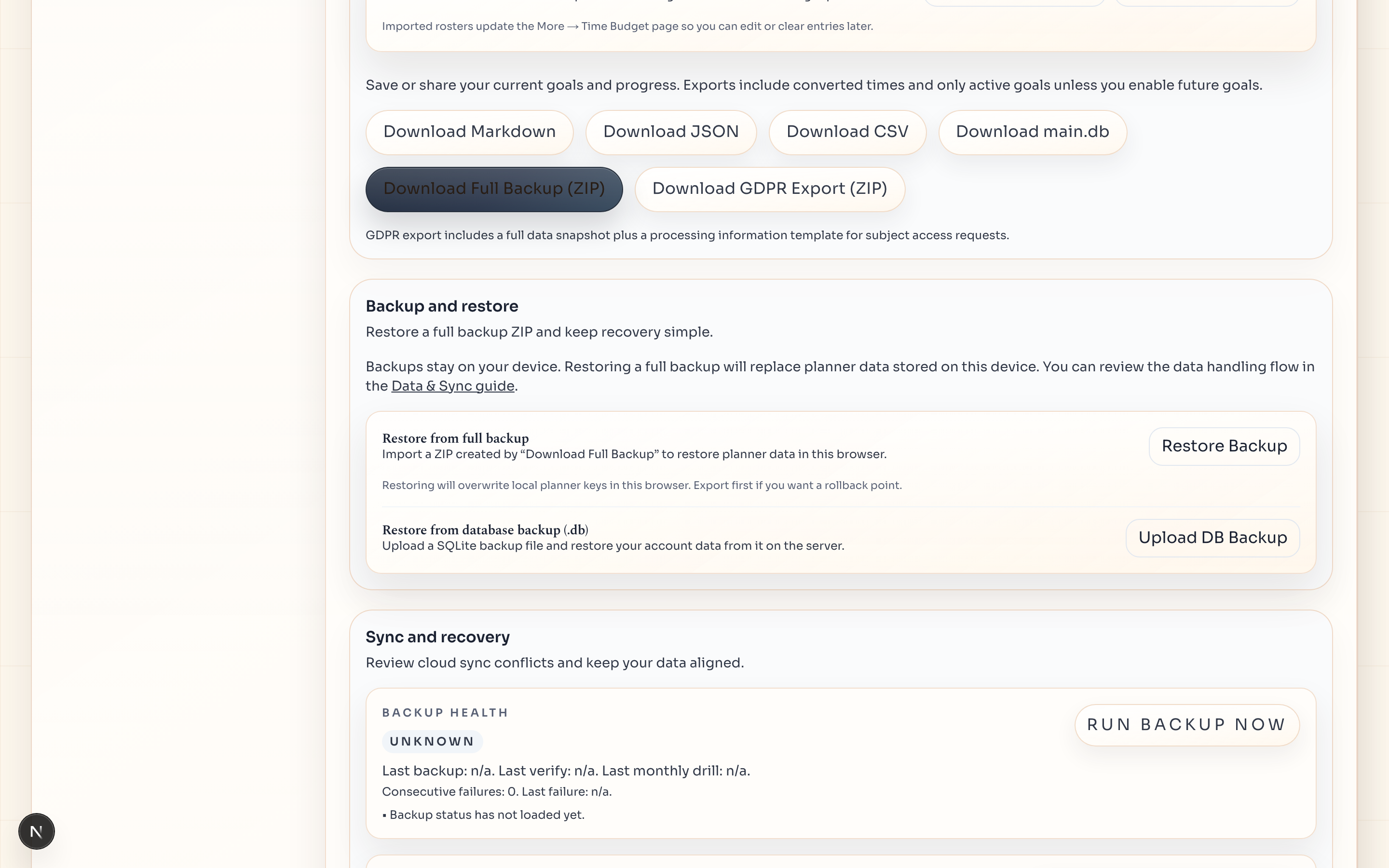
This page shows the surfaces that prove planner sync and recovery: the shared weekly workspace, imported calendars inside the planner, and the backup/export controls you rely on when something goes wrong.
Account copy
Signed-in changes go back to the same planner across devices.
The point of planner sync is not vague cloud storage. It is keeping goals, tasks, calendars, and weekly state consistent when you move between desktop, tablet, and phone.
- Planner and goal writes are confirmed against the API before they count as canonical.
- The browser keeps a fast working copy, but the signed-in account copy stays authoritative.
- The same week reappears when you pick the workspace up somewhere else.
Calendar connections
Bring Google and Outlook into the same planning surface.
Connected calendars are useful because they change what the planner already knows about the week before you place tasks around it.
- Imported events show up as read-only cards inside the planner.
- You choose which accounts and calendars are connected.
- Disconnecting calendars is handled from Settings when you no longer want them in view.
Recovery + export
Exports are immediate. Rolling backups support recovery later.
This is the most trust-sensitive part of the product, so the page shows recovery tooling directly instead of repeating generic planner views.
- Export a backup ZIP from Settings whenever you want a portable copy.
- Server-side backups are created on a rolling schedule for restore workflows.
- Backup and export access stay available on both Free and Pro.
Backups and exports
Planner exports are immediate. Backups support recovery.
Use Settings to download a backup ZIP whenever you want a portable copy. Server-side backups are created on a rolling schedule so recovery is possible if you need it later. Backup availability is included on both Free and Pro.